UTM tracking for affiliates involves adding custom URL parameters to links so marketers can trace exactly which campaigns, channels, and creatives drive traffic and conversions. When combined with Google Analytics for affiliate marketing, UTM data gives affiliates the visibility they need to scale what works and cut what doesn’t.
Affiliate marketing runs on performance. Every click, every conversion, every dollar earned traces back to a decision—what to promote, where to promote it, and how to frame the message. But without reliable data, those decisions are little more than educated guesses.
UTM tracking for affiliates solves that problem. By appending short snippets of code to your affiliate links, you can track exactly where your traffic comes from, which campaigns are generating revenue, and which channels are quietly draining your budget. It’s one of the most powerful, yet underutilized, tools in an affiliate marketer’s arsenal.
This guide covers everything you need to know—from the basics of UTM parameters to advanced strategies, Google Analytics for affiliate marketing, the best affiliate tracking tools available, and niche applications like dating affiliate program campaigns. Whether you’re just getting started or looking to sharpen an existing tracking setup, you’ll find actionable insights here.
What Is UTM Tracking, and Why Does It Matter for Affiliates?
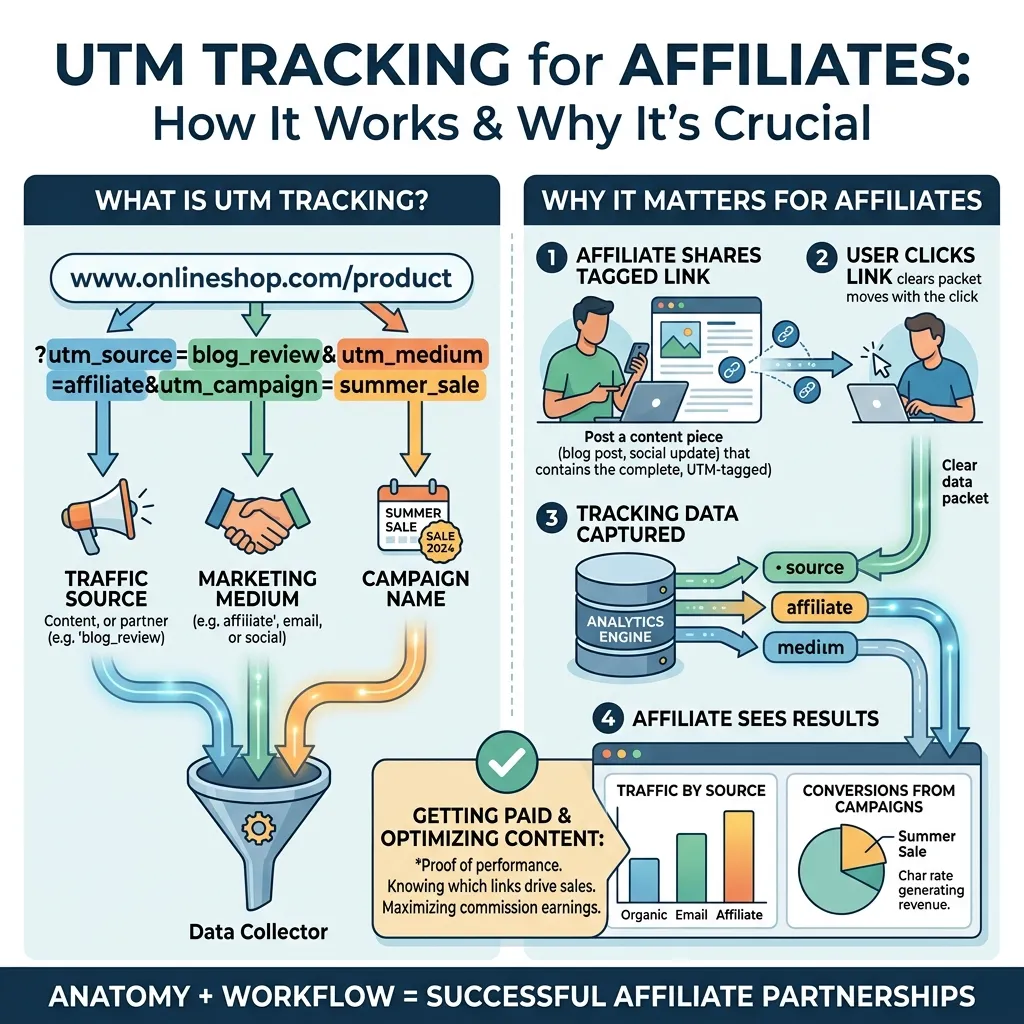
UTM stands for Urchin Tracking Module—a naming convention inherited from Urchin Software, the analytics company Google acquired in 2005. A UTM parameter is a tag you add to a URL that tells your analytics platform where a visitor came from and what prompted them to click.
For affiliates, this matters enormously. Affiliate marketers typically promote the same offer across multiple channels—email lists, paid social, organic content, YouTube, comparison sites—and without UTM tracking, all of that traffic can appear as a single undifferentiated blob in your analytics dashboard. You’d know that 500 people visited your landing page, but not that 400 came from your email campaign and only 12 from your banner ads.
UTM tracking for affiliates creates clarity. It connects traffic sources to conversion outcomes, allowing affiliates to double down on what’s working and stop wasting spend on what isn’t.
The Five UTM Parameters Every Affiliate Should Know
Every UTM link is built from up to five parameters. Understanding each one is foundational to any serious tracking setup.
utm_source
This identifies where your traffic originated. Common values include google, facebook, newsletter, or the name of a specific affiliate partner. For affiliates running campaigns across multiple platforms, this is often the most critical parameter.
utm_medium
This describes the marketing medium or channel type—email, cpc, social, banner, organic. Think of it as the category your source falls into.
utm_campaign
This names the specific campaign. For example, summer_sale_2025 or black_friday_promo. Affiliates running multiple offers simultaneously use this to separate performance data by initiative.
utm_term
Primarily used for paid search, this parameter captures the keyword that triggered an ad. For affiliates bidding on keywords, this is essential for identifying which search terms convert.
utm_content
This differentiates between multiple links within the same campaign—for example, two different banner sizes or two CTAs in the same email. It’s especially useful during A/B testing.
Best Practices for Naming UTM Parameters
Consistency is everything. A poorly named UTM structure quickly becomes a data nightmare. Follow these guidelines:
- Use lowercase only. Analytics platforms are case-sensitive.
Facebookandfacebookwill appear as two separate sources. - Replace spaces with underscores or hyphens. Never use spaces in UTM values.
- Be descriptive but concise.
email_weekly_digestis better thanemail1orweekly-email-newsletter-sent-to-subscribers. - Create a shared naming convention document and stick to it across your team or campaigns. This ensures data remains comparable over time.
- Avoid using personally identifiable information (PII) in UTM parameters. This creates GDPR and privacy compliance risks.
How to Create UTM Links for Affiliate Campaigns
Building UTM links doesn’t require technical knowledge. Google’s Campaign URL Builder (available at ga-dev-tools.google.com) is a free, straightforward tool. Simply enter your destination URL and fill in the UTM fields. The tool generates a tagged URL instantly.
Here’s an example. Suppose you’re promoting a dating affiliate program and want to track traffic from a Facebook ad campaign:
https://yourlandingpage.com/?utm_source=facebook&utm_medium=paid_social&utm_campaign=dating_promo_may2025&utm_content=banner_v1
Each element tells Google Analytics for affiliate marketing exactly what to record when someone clicks that link.
Other UTM builder tools worth using:
- Bitly – Combines URL shortening with UTM building, useful for social media where long URLs look unwieldy.
- RocketLink – Adds retargeting pixels to UTM-tagged links, a powerful combination for affiliate remarketing.
- UTM.io – Offers team-based UTM management with templates, helping maintain consistency at scale.
Common UTM Mistakes Affiliates Should Avoid
Even experienced marketers make these errors:
- Tagging internal links. UTM parameters on internal links reset the session source in Google Analytics, making your data unreliable. Only tag external traffic sources.
- Inconsistent naming. Mixing
fbandfacebookin the source field splits your data into two rows. Standardize from day one. - Forgetting to tag all traffic sources. If only some of your links carry UTM parameters, your “direct” traffic bucket will be artificially inflated.
- Duplicating parameters. Some third-party platforms auto-append their own tracking parameters. Always check that UTM tags aren’t being overwritten or duplicated.
Integrating UTM Tracking with Google Analytics for Affiliate Marketing
Google Analytics for affiliate marketing is where UTM data becomes actionable intelligence. Once visitors land on your pages via tagged links, Google Analytics captures and organizes that data automatically.
Where to Find UTM Data in Google Analytics
In Google Analytics 4 (GA4), UTM data surfaces in Acquisition > Traffic acquisition. You can break down traffic by source, medium, and campaign, then layer on conversion data to see which UTM combinations drive the most value.
For deeper analysis, use Explorations in GA4 to build custom reports. For instance, you might create a report that compares conversion rates by utm_source and utm_campaign side by side, giving you a direct performance comparison across channels.
Setting Up Conversion Tracking
UTM data alone isn’t enough. You need to define what a conversion means for your affiliate campaigns—whether that’s a click to the advertiser’s site, a form submission, or a confirmed sale. Set up GA4 conversion events tied to these actions, and your UTM reports will show not just who visited, but who converted.
Advanced UTM Strategies for Affiliate Marketers
A/B Testing with UTM Parameters
The utm_content parameter is built for split testing. Create two versions of an ad, email, or landing page, tag each with a unique utm_content value, and run them simultaneously. Your analytics data will show which version drives better engagement and conversions—no guesswork required.
Audience Segmentation
Once you’ve accumulated UTM data, segment your audience by source or campaign to identify behavioral differences. Visitors from utm_source=email may convert faster but at lower volume, while visitors from utm_source=youtube may take longer but generate higher average order values. These insights should directly shape your promotional strategy.
Tracking Multiple Offers Simultaneously
Running UTM tracking for affiliates across multiple offers requires disciplined campaign naming. Use a consistent naming structure like [offer]_[channel]_[date]—for example, vpn_offer_facebook_may2025. This makes filtering and comparing offer performance straightforward in your analytics platform.
Best Affiliate Tracking Tools Beyond Google Analytics

Google Analytics is the default choice, but the best affiliate tracking tools go further—offering click-level data, fraud detection, and affiliate-specific reporting that GA4 wasn’t designed to provide.
Voluum
Voluum is one of the leading affiliate tracking platforms, offering real-time reporting, AI-powered traffic distribution, and direct integration with major ad networks. Affiliates running high-volume paid campaigns often choose Voluum for its speed and precision.
RedTrack
RedTrack specializes in performance marketing attribution. Features include multi-touch attribution modeling, server-to-server postback tracking, and team collaboration tools—making it well suited for agencies managing multiple affiliate clients.
ClickMagick
ClickMagick is popular among solo affiliates for its affordability and simplicity. Features include link cloaking, bot filtering, conversion tracking, and funnel analytics. It integrates cleanly with UTM parameters, allowing affiliates to use both systems together.
ThriveTracker
ThriveTracker targets advanced affiliates and media buyers, offering granular data segmentation, A/B split testing, and cloud-hosted infrastructure for high traffic volumes.
What to look for in the best affiliate tracking tools:
- Real-time click and conversion data
- Integration with your ad platforms and affiliate networks
- Fraud detection and bot filtering
- Support for postback (server-to-server) tracking
- Custom attribution models
Affiliate Tracking Explained: Beyond the Basics
Understanding Conversion Paths
Most conversions don’t happen on the first click. A visitor might discover your content through organic search, leave without converting, see a retargeted ad a week later, and then click an email link to finally make a purchase. UTM tracking for affiliates captures the final click, but understanding the full conversion path requires multi-touch attribution.
GA4’s path exploration reports can reveal common conversion sequences. Use this data to understand which channels warm up audiences versus which ones close them. read more details : Affiliate Tracking Explained
Lifetime Value and Affiliate Performance
Conversion volume tells only part of the story. High-LTV customers—those who make repeat purchases or upgrade their subscriptions—are significantly more valuable than one-time buyers. If your affiliate tracking data connects to CRM or billing systems, you can identify which UTM sources generate the most valuable long-term customers, not just the most conversions.
Attribution Models in Affiliate Marketing
Attribution models determine how credit is assigned when multiple touchpoints contribute to a conversion. Common models include:
- Last-click: Full credit goes to the last UTM-tagged link clicked before conversion. Simple, but ignores earlier touchpoints.
- First-click: Credits the first interaction. Useful for understanding awareness channels.
- Linear: Distributes credit equally across all touchpoints.
- Data-driven (GA4 default): Uses machine learning to assign credit based on actual conversion path data.
For most affiliates, data-driven attribution offers the most accurate picture of channel performance.
UTM Tracking for Dating Affiliate Programs
Niche markets like a dating affiliate program come with their own tracking considerations. Dating offers tend to have high competition, platform-specific restrictions on ad copy, and audiences that respond differently across traffic sources.
Tailoring UTM Strategies for Dating Affiliate Campaigns
When running a dating affiliate program, segmenting by demographic and device is critical. Use utm_content to differentiate ad creatives by gender targeting, age group, or offer angle (casual dating vs. serious relationships). This level of granularity reveals which audiences convert at the highest rate for each specific offer.
Platform Restrictions and Workarounds
Many advertising platforms restrict dating-related content. When cloaking or redirect tracking is necessary, ensure your UTM parameters survive the redirect chain intact. Test links before launching campaigns to confirm that all five parameters are being passed correctly to your analytics platform.
Maximizing Performance in Competitive Niches
Dating affiliate marketing is highly competitive. Small improvements in conversion rate can produce meaningful revenue gains at scale. Use UTM data to run systematic A/B tests on landing page headlines, CTAs, and offer placements. Even a 0.5% improvement in conversion rate, scaled across thousands of daily clicks, translates to significant additional earnings.
Optimizing Affiliate Campaigns Using UTM Insights
Identifying Underperforming Channels
Sort your UTM campaign report by cost per conversion. Channels with high click volume but low conversion rates—or high CPA relative to affiliate commission—are the first candidates for budget reallocation.
Scaling What Works
When a specific UTM source consistently outperforms others, the priority is to scale it. Increase ad spend, create more content variations, or negotiate better placements. UTM data gives you the evidence to justify these decisions confidently.
Building a Continuous Improvement Loop
Treat UTM tracking as an ongoing process, not a one-time setup. Review your campaign data weekly during active promotions and monthly for longer-running campaigns. Over time, patterns emerge that reveal seasonal trends, audience fatigue, and new opportunities.
The Future of UTM Tracking for Affiliates

UTM tracking for affiliates isn’t going away—but it is evolving. Increased browser privacy restrictions, the phase-out of third-party cookies, and the growth of server-side tracking are reshaping how affiliate marketers collect and interpret data.
Server-to-server (S2S) postback tracking is emerging as a reliable complement to UTM parameters, particularly for mobile and in-app conversions where URL-based tracking has limitations. Affiliates who invest in understanding both systems will be better positioned as the privacy landscape continues to shift.
The core principle, however, remains unchanged: the affiliates who win are the ones who measure accurately, interpret clearly, and act on what the data tells them. UTM tracking is the foundation of that process. Set it up correctly, maintain it consistently, and let the data guide your decisions.
Frequently Asked Questions
What is UTM tracking and why is it important for affiliates?
UTM tracking for affiliates involves appending custom parameters to URLs to identify where website traffic originates. Affiliates use UTM data to determine which campaigns, channels, and creatives drive conversions—enabling data-driven budget allocation and campaign optimization.
How do I create a UTM link for my affiliate campaigns?
Use Google’s free Campaign URL Builder at ga-dev-tools.google.com. Enter your destination URL, fill in the UTM fields (source, medium, campaign, and optionally term and content), and copy the generated link. Tools like Bitly and UTM.io offer additional features like link shortening and team-based management.
Can I track individual affiliate performance with UTM parameters?
Yes. Assign each affiliate a unique utm_source value or create unique UTM-tagged links for each partner. When combined with a conversion tracking setup in Google Analytics for affiliate marketing, you can measure each affiliate’s traffic quality, conversion rate, and revenue contribution.
How does Google Analytics help with UTM tracking for affiliate marketing?
Google Analytics for affiliate marketing captures UTM parameter data automatically when tagged links are clicked. In GA4, the Traffic Acquisition report breaks down sessions and conversions by source, medium, and campaign. Custom Exploration reports allow deeper analysis of affiliate performance across segments.
What are the best practices for naming UTM parameters?
Use lowercase letters only, replace spaces with underscores or hyphens, keep values descriptive but concise, maintain a shared naming convention document, and never include personally identifiable information. Consistency is the most important factor—inconsistent naming splits data and makes analysis unreliable.
Are there any free tools for UTM tracking?
Google’s Campaign URL Builder is free and widely used. Google Analytics 4 itself is free and captures UTM data automatically. Bitly offers free link shortening with basic UTM support. For more advanced affiliate-specific tracking, tools like Voluum, RedTrack, and ClickMagick offer paid plans with free trials.
How often should I review my UTM tracking data?
Review UTM data weekly for active paid campaigns and monthly for content-driven or evergreen affiliate campaigns. During major promotional periods—like product launches or seasonal sales—daily monitoring helps you catch issues and optimize in real time.
What are common challenges in UTM tracking and how can I overcome them?
The most common challenges are inconsistent naming conventions, tagging internal links (which corrupts session data), and UTM parameters being stripped by redirects. Solve these by creating a naming convention guide, auditing your links regularly, and testing all redirect chains before launching campaigns.
Can UTM tracking be used for a dating affiliate program?
Yes. UTM tracking is highly effective for a dating affiliate program. Use utm_content to differentiate creatives by audience segment, test multiple ad angles simultaneously, and monitor conversion rates by demographic. Ensure UTM parameters pass through any redirect or cloaking layers intact.
How does UTM tracking differ from other affiliate tracking methods?
UTM tracking is URL-based and relies on the browser to pass parameter data to your analytics platform. Other methods—like server-to-server postback tracking—send conversion data directly between servers, bypassing the browser entirely. Postback tracking is more reliable for mobile environments, while UTM tracking is simpler to implement and works well for web-based campaigns.
What impact does UTM tracking have on SEO for affiliate sites?
UTM parameters don’t affect organic SEO rankings. However, duplicate content concerns can arise if UTM-tagged URLs are indexed by search engines. Prevent this by adding ? parameters to your robots.txt exclusion rules or using canonical tags to point to the clean URL version of each page.
How can I use UTM data to improve my ROI in affiliate marketing?
Compare conversion rates and revenue across UTM sources and campaigns to identify your highest-performing channels. Reallocate budget toward top performers, run A/B tests using utm_content to optimize creatives, and use audience segmentation data to tailor messaging. Over time, this compounding optimization significantly improves return on affiliate marketing spend.